Don’t shave that yak! (How we added Go to Visual Studio)
Yak shaving1 describes doing some seemingly useless task that is necessary to complete another task, which is necessary to complete other tasks, which will eventually allow you to complete your initial goal.
In our case, the goal was building VisualDock Server with the help of Visual Studio (the original one, not VS Code). VisualDock relies on Moby. Moby is written in Go. But Visual Studio doesn’t support Go.
Where’s our yak?
Most of VisualDock Server is written in C#, with a lot of MSBuild magic happening behind the scenes. This makes using Visual Studio a pretty natural choice.
However, Visual Studio is like a limousine. If you do .NET and C++ development, occasionally throwing in some TypeScript, you get a lavish ride from point A to B. But if you want to go slightly off-road, you gotta do something about that suspension beforehand2.
In our case, the off-road exists due to depending on the Moby project, written in Go. We regularly need to browse its code, jump to definitions and navigate through references. A proper test runner and debugging support have their use as well.
Go isn’t the usual guest in Visual Studio, and the only thing offered out of the box is the TextMate-based syntax highlighting. So, for a proper development experience, you need to keep two different IDEs and switch back and forth between them. The cost of that tends to stack up, especially when aiming for a coherent development environment across the team.
“Wouldn’t it help if we built an extension with a minimal Go integration for Visual Studio?”
Surely, that would help. We have experience in developing VS extensions, which would likely make it a weekend-size task. But isn’t that a massive detour from building the actual product?
Maybe this yak is different?
There’s the yak: you need a Go integration plugin, which will help you work with a subcomponent written in Go, which is responsible for a significant part of your business logic, which is needed to build your final product.
Conventional wisdom says that if you find yourself with a dependency chain this long, you need to cut it, find an alternative or a compromise.
But… there are benefits in unifying the development environment, and, as it happened, we were in the right mood to give it a try.
How did we shave the yak?
We decided to make a simple Go integration extension for Visual Studio.
Visual Studio offers decent Language Server Protocol (LSP) support. So, building a language integration extension is mostly about properly wiring things up and deciding on the feature set.
In case of Go, the standard language server is Gopls, and it’s offered by the core language team. We just had to teach it to speak with Visual Studio.
Surprisingly, the actual implementation is rather uninteresting to write about. But we learnt a few things along the way, and they seem to be worth mentioning:
1. Empty VSIX extension project: 2026 edition
Pretty much everyone in the .NET ecosystem has moved to so-called SDK-style projects.
These can be identified by the <Project Sdk="..."> preamble.
A VSIX package is the standard way to bundle and distribute Visual Studio extensions. For a long time, the default VSIX project template in Visual Studio wasn’t using the SDK-style, but it seems there is finally an official way to do it.
The trick is to reference the Microsoft.VisualStudio.Sdk.Build SDK and specify a custom
TargetFramework, like vs17.12. Here is a quick snippet of what that modern project
file looks like:
<Project Sdk="Microsoft.VisualStudio.Sdk.Build">
  <PropertyGroup>
    <RootNamespace>VsGo</RootNamespace>
    <AssemblyName>VsGo</AssemblyName>
    <AppendRuntimeIdentifierToOutputPath>false</AppendRuntimeIdentifierToOutputPath>
    <AppendTargetFrameworkToOutputPath>false</AppendTargetFrameworkToOutputPath>
    <TargetFramework>vs17.12</TargetFramework>
    <Platforms>AnyCPU</Platforms>
  </PropertyGroup>
  <PropertyGroup>
    <GeneratePkgDefFile>true</GeneratePkgDefFile>
    <UseCodebase>true</UseCodebase>
    <IncludeAssemblyInVSIXContainer>true</IncludeAssemblyInVSIXContainer>
    <IncludeDebugSymbolsInVSIXContainer>false</IncludeDebugSymbolsInVSIXContainer>
    <IncludeDebugSymbolsInLocalVSIXDeployment>false</IncludeDebugSymbolsInLocalVSIXDeployment>
    <CopyBuildOutputToOutputDirectory>true</CopyBuildOutputToOutputDirectory>
    <CopyOutputSymbolsToOutputDirectory>true</CopyOutputSymbolsToOutputDirectory>
    <StartAction>Program</StartAction>
    <StartProgram Condition="'$(DevEnvDir)' != ''">$(DevEnvDir)devenv.exe</StartProgram>
    <StartArguments>/rootsuffix Exp</StartArguments>
  </PropertyGroup>
  …
</Project>
2. Unified settings are the new way to go
Occasionally, Visual Studio picks up a thing or two from VS Code. This time, it comes in the form of the updated Unified settings:
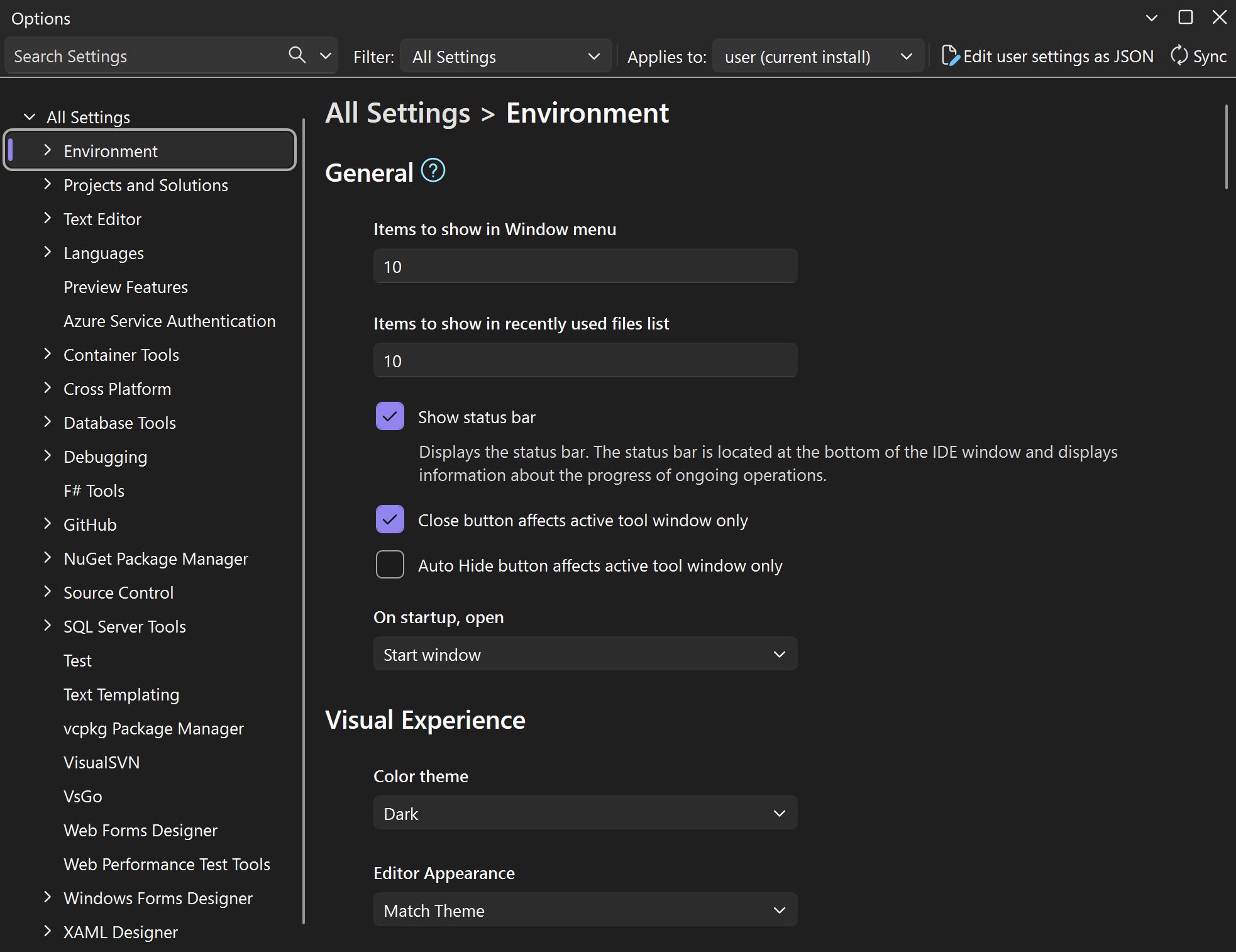
Extension writers are pretty much forced to use them, because sticking to the older pattern will cause your extension to be labeled “Legacy” in the Settings window.
We still have some work to do here, because implementing these new settings is currently undocumented. Hoping to post on this topic soon.
3. Visual Studio cuts some corners in its LSP implementation
In the LSP protocol, the client (Visual Studio) provides the server (Gopls) with different configuration settings. The synchronization model is twofold:
-
The client can send the
workspace.didChangeConfigurationrequest to notify the server that the settings have changed. -
The server can fetch the configuration settings it needs from the client with the help of the
workspace.configurationrequest.
Unfortunately, the Visual Studio LSP client doesn’t implement the pull part of
this model, and doesn’t support workspace.configuration requests. This results
in Gopls not picking up some of the configuration settings.
We filed an issue for this, and hope that it will get fixed at some point.
The shaved yak 🐂
In its current form, our extension provides context-aware syntax highlighting, code completion, the ability to navigate to definitions, find references, and rename things:
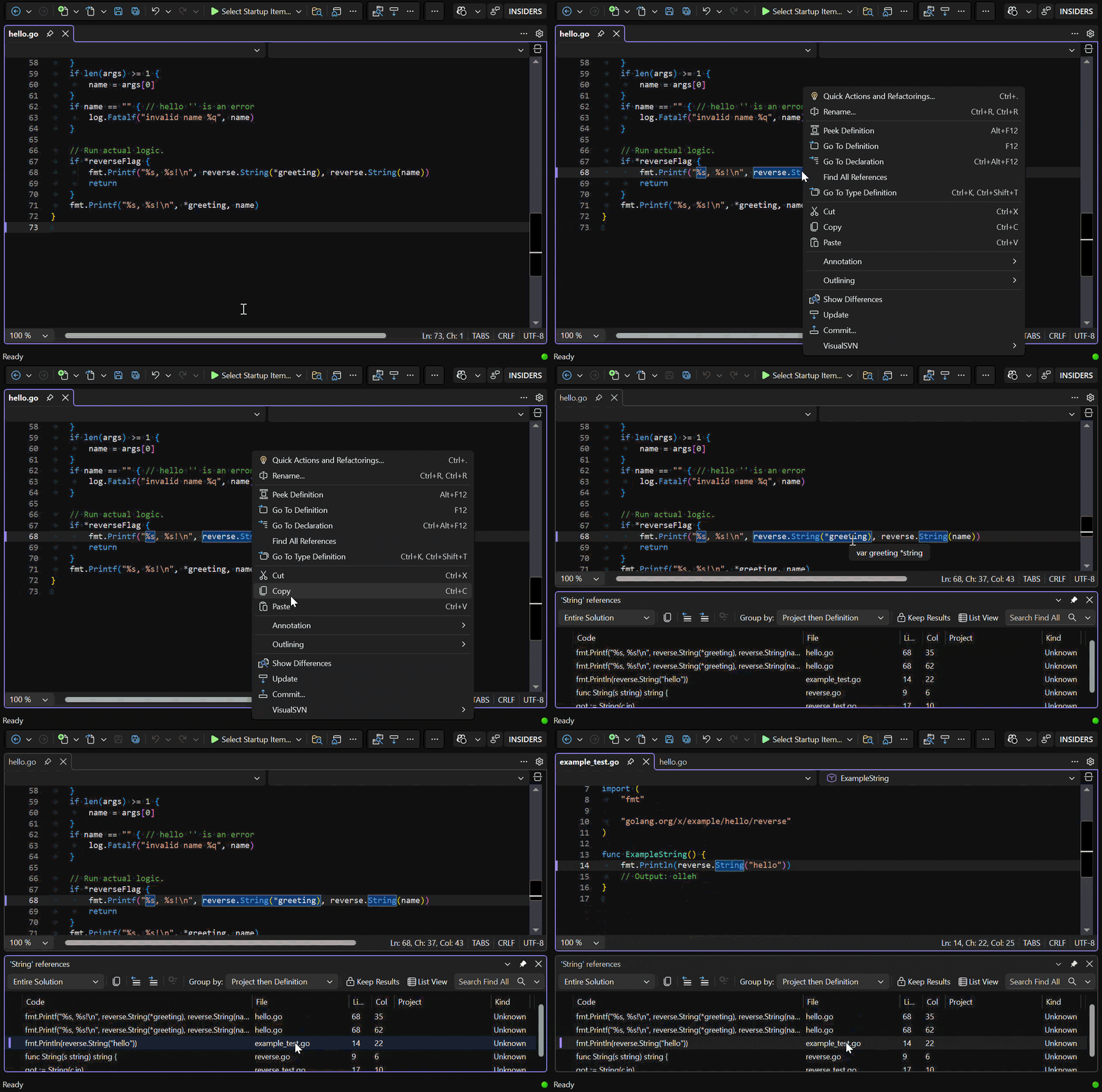
It isn’t eye-catching, but gets the work done. A couple of things are still on the roadmap.
If you would like to try out the extension, search for Go on the Visual Studio Marketplace. You can’t miss it.
Was it worth it?
Contrary to the title, we chose to shave the yak and build an extension to manage all our code from one IDE.
There is some controversy around whether yak shaving is a good thing. Opponents say that it indicates a long dependency chain that can be avoided entirely by making better decisions. In this case, some of the decisions (e.g., using Moby) are unavoidable, thus making the argument less applicable.
Overall, there are both good and bad aspects. Maybe it’s too early for a retrospective, but the benefits seem to outweigh the drawbacks:
The bads
- It was a distraction from the main project.
- It consumed some time and may be viewed as a form of procrastination.
- It may continue siphoning time for future maintenance, such as adding debugging support.
The goods
- It was a distraction from the main project :)
- Being able to work with all your code in one IDE is a fairly important thing, with the benefits accumulating over time.
- We built something that might be useful to other developers, learning a thing or two along the way.
- I finally get to reference the legendary xkcd comic: